SQL Server 2008 – Manage unstructured data using FILESTREAM FeatureThis document details the implementation of FILESTREAM within SQL Server 2008. In the previous versions of SQL Server, storing unstructured data had many challenges, like maintaining transactional consistency between structured and unstructured data , manageability (backup / restore/security) , Managing archiving and retention policies and performance and scalability were few challenges among them. SQL Server 2008 introduced FILESTREAM feature to resolve these issues. FILESTREAM, eliminate the complexity in an application development and reduce the cost of managing unstructured data. FILESTREAM also increases the manageability by extending the capabilities that are currently available only to relational data to non-relational data (backup / restore /security).
SQL Server 2008 introduces two new capabilities for storing BLOB data:
• FILESTREAM: An attribute you can set on a varbinary column so that the data is stored on the file system (and therefore benefits from its fast streaming capabilities and storage capabilities), but is managed and accessed directly within the context of the database.
• Remote BLOB Storage: A client-side application programming interface (API) that reduces the complexity of building applications that rely on an external store for BLOBs and a database for relational data.
Additionally, SQL Server 2008 continues support for standard BLOB columns through the varbinary data type.
What are the properties a product should possess to clasify itself as an Enterprise Ready Product? An Enterprise Ready Product should support fundamental properties like:
• Scalability
• Security
• Maintainability
• Availability
• Auditability
• Reliability
SQL Server 2008 is an Enterprise Ready Product as it possess all the fundamental qualities that define an Enterprise Ready Product. FILESTREAM is one of the enhancements made within SQL Server 2008 in order to classify it as an Enterprise Ready Product.
It is very essential that an Enterprise Solution supports storage of both structured and unstructured data within an organization. It is important that this structured data and unstructured data should be secured and managed. For instance, an application dealing with patient information should support storage of structured data like patient information and unstructured data like ECG, x-ray report and other case history details. Both Security and Privacy are very important aspects in any type of storages. In the earlier versions of SQL Server though BLOB storage supported these requirement, it had its constraints. In order to address these requirenments, SQL Server 2008 has introduced FILESTREAM.
What is FILESTREAM?FILESTREAM is a new feature of SQL Server 2008 which allows large binary unstructured data like documents and images to be stored directly into an NTFS file system. FILESTREAM is not a Datatype like Varbinary(max). FILESTREAM is an Attribute or property which can be enabled on a Varbinary(max) datatype column, which instruct the database engine to store the data directly on the file system. Unstructred data like documents or images remain as an integral part of the database and maintain a transactional consistency. The highpoint of this feature is simultaneous performance of the file system as well as maintenance of transactional consistency between the Structured and Unstructured data.
FILESTREAM enables the storage of large binary data, traditionally managed by the database, to be stored outside the database as individual files, which can be accessed using an NTFS streaming API. Using NTFS streaming APIs allows efficient performance of common file operations while providing all the database services, including integrated security and backup.
FILESTREAM integrates the SQL Server Database Engine with an NTFS file system by storing varbinary(max) binary large object (BLOB) data as files on the file system. Transact-SQL statements can INSERT, UPDATE, DELETE, SELECT, SEARCH, and BACK UP FILESTREAM data. Win32 file system interfaces provide streaming access to the data. The standard varbinary(max) limitation of 2-GB file sizes does not apply to BLOBs that are stored in the file system
FILESTREAM feature with other SQL Server editions • SQL Server Express supports FILESTREAM and is not constrained by the 4GB limitation.
• Replication: The Varbinary(max) column which has enabled FILESTREAM from the publisher can be replicated to the subscriber. The Replicating table that has a FILESTREAM enabled column cannot be replicated to SQL Server 2000 subscriber. All other replication related limitations are applicable in this case as well.
• Log shipping supports FILESTREAM. It is essential that
Both the primary and secondary servers have either SQL Server 2008 or a later version running FILESTREAM is enabled
• For Failover clustering, FILESTREAM file groups must be placed on a shared disk. FILESTREAM must be enabled on each node in the cluster that will host the FILESTREAM instance.
• Full-text indexing works with a FILESTREAM column in the same way that it does with a varbinary(max) column.
Pre-requisites for using FILESTREAM feature• When a table contains a FILESTREAM column, each row must have a unique row ID.
• FILESTREAM data containers cannot be nested.
• While using failover clustering, the FILESTREAM filegroups must be on shared disk resources.
• FILESTREAM filegroups can be on compressed volumes.
PermissionIn SQL Server, FILESTREAM data is secured by granting permissions at the table or column level, similar to the manner in which any other data is secured. Only if you have permissions to the FILESTREAM column in a table, you can access its associated files.
When to implement FILESTREAM featureThe size and use of the data, determines whether you should use database storage or file system storage. If the size of the data is small, SQL Server can store BLOB data in Varbinary(max)column in a table. This gives better performance and manageability.
Before opting for the FILESTREAM attribute check the following:-
• The average data size is larger than 1 MB
• Fast read access is required
• The Application is being developed using a middle tier for application logic
FILESTREAM Limitations Listed below are the limitations one should be aware of prior to implementing this feature.
• Objects can be stored only on local volumes
• Size is limited to the volume size
• Not supported in database snapshot
• Database mirroring is not supported
• Transferent Encryption is not supported
• Can not be used in table valued parameters
Configuring FILESTREAM feature To specify that a column should store data on the file system, assign the FILESTREAM attribute on a varbinary(max) column. This results in the Database Engine storing all the data for that column on the file system, but not in the database file. Before you start using FILESTREAM, you must enable it on the instance of the Database Engine. You should also create a local share for files to be stored.
Following are the steps to configure FILESTREAM:Step 1: Create a folder in a Local VolumeCreate a folder in a local volume where the files (documents/Images) will be stored.
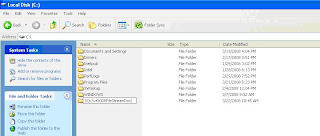
In figure 1 above a folder called SQLSvr2008FILESTREAMDoc has been created within C:\ which will contain all the FILESTREAM objects.
Step 2: Configuring an Instance for FILESTREAM capabilityBy default, the SQL server instance is disabled for FILESTREAM storage. This property has to be enabled explicitly by using the sp_FILESTREAM_configure system stored procedure.
EXEC sp_FILESTREAM_configure
@enable_level = 3,
@share_name = "MyFILESTREAMSqlServerInstance";
RECONFIGURE
There are two parameters to be provided for this sp, @enable_level and @share_name
• @enable_level = level
Note: This specifies the access level of FILESTREAM storage that you are enabling on the instance of SQL Server.Here level is defined as an integer and it can have a value of 0 to 3.
• @share_name = 'share_name'
Note: This specifies the file “share_name” that is used to access FILESTREAM values through the file system. share_name is a sysname. You can set the share_name value when you change the enabled state from 0 (disabled) or 1 (Transact-SQL only) to file system access (2 or 3).
You may check whether the instance is configured or not by running following query
SELECT SERVERPROPERTY ('FILESTREAMShareName')
,SERVERPROPERTY ('FILESTREAMConfiguredLevel')
,SERVERPROPERTY ('FILESTREAMEffectiveLevel');
Once you run this command in the Query analyzer, you can check whether the share is created or not from the CMD prompt. As shown in figure 2 below, Run NET SHARE in the CMD prompt and see the share with a name which we passed as the second parameter.
 Note:
Note: When you run sp_FILESTREAM_configure, you might have to restart the instance of SQL Server. A computer restart is required when you enable FILESTREAM storage for the first time, or after you install any update to the RsFx driver. An instance restart is required when you disable FILESTREAM storage from an enabled state. To restart the instance of SQL Server, run the RECONFIGURE statement after you run sp_FILESTREAM_configure.
PermissionsRequires membership in the sysadmin fixed server role and the Windows Administrators group on the local computer.
Step 3: Creat a Database with Filestream CapabilityThe Next step is to create a new database which will use the FILESTREAM capability.
CREATE DATABASE Archive
ON
PRIMARY ( NAME = Arch1,
FILENAME = 'c:\data\archdat1.mdf'),
FILEGROUP FILESTREAMGroup1 CONTAINS FILESTREAM( NAME = Arch3,
FILENAME = 'c:\SQLSvr2008FILESTREAMDoc\FILESTREAMDemo')
LOG ON ( NAME = Archlog1,
FILENAME = 'c:\data\archlog1.ldf')
Note: • The only difference in the above statement compared to a normal CREATE DATABASE statement is the filegroup creation for FILESTREAM objects.
• The following phrase in the above statement needs an explanation:
FILEGROUP FILESTREAMGroup1 CONTAINS FILESTREAM( NAME = Arch3,
FILENAME = 'c:\SQLSvr2008FILESTREAMDoc\FILESTREAMDemo'
It is important to make note that the root folder must exist but not the subfolder. i.e. in the folder “SQLSvr2008FILESTREAMDoc” which has already been created in Step1, the subfolder (FILESTREAMdemo) must not exist.
Suppose within c:\ a folder called SQLSvr2008FILESTREAMDoc and a subfolder called FILESTREAMDemo' has been created. If the above mentioned script is run then we would get the following error :-
ErrorMsg 5170, Level 16, State 2, Line 1
Cannot create file 'c:\SQLSvr2008FILESTREAMDoc\FILESTREAMDemo' because it already exists. Change the file path or the file name and retry the operation.
Important : As mentioned earlier, it should be noted that the sub folder must not exist. SQL Server will automatically create this sub folder and grant appropriate permissions and other settings. If you drop the database the sub folder will automatically be removed by the system
Once the database has been created , the FILESTREAM folder is as shown in figure below:
 Note:
Note: This FILESTREAM.hdr file should not be tampered with in anyway to ensure proper functionality. This file is exclusively maintained and used by sql server.
Step 4: Creat a table to store unstructrured dataThe next step is to create a table. Once the database is enabled for FILESTREAM capability, you can create tables which have varbinary(max) column to store FILESTREAM objects.
Use Archive
CREATE TABLE Archive.dbo.Records
(
[Id] [uniqueidentifier] ROWGUIDCOL NOT NULL UNIQUE,
[SerialNumber] INTEGER UNIQUE,
[Chart] VARBINARY(MAX) FILESTREAM NULL
)
GO
Note :Here the UniqueIdentifier column is a must. Each row must have a unique row ID. The column which should store BLOB should be of varbinary(max) and you should mention FILESTREAM Atrribute.
Step 5: DML Statements to store Filestream dataNow the database and the table are ready to be stored as BLOB objects.
Inserting data in the tableInserting a row into a table which contains a FILESTREAM enabled column is just like any other t-sql insert statement. When you insert data into a FILESTREAM column, you can insert NULL or a varbinary(max) value.
Example:(a) Inserting Null value to a varbinary(max) column
INSERT INTO Archive.dbo.Records
VALUES (newid (), 1, NULL);
Note: If the FILESTREAM value is null then the file in the file system is not created.
(b) The following example shows how to use INSERT to create a file that contains data. The Database Engine converts the string 'Seismic Data' into a varbinary(max) value. FILESTREAM will create the Windows file if it does not already exist. The data is then added to the data file.
INSERT INTO Archive.dbo.Records
VALUES (newid (), 3,
CAST ('Seismic Data' as varbinary(max)));
Note: There are many examples in BOL. Please refer BOL for more FILESTREAM DML statements
Step 6: Deleting FILESTREAM dataDelete From Records
T-SQL Delete statement removes the row from the table as well as the underlying file system files. The underlying files are removed by the FILESTREAM garbage collector.
Note: A FILESTREAM generates minimal log information and hence does not generate enough activity to fill up log files by itself. If there is no other activity generating log entries, CHECKPOINT may not be triggered. Hence, the files will not get deleted at the same time when you delete a corresponding row from the table. Physical deletion of the file happens only when CHECKPOINT occurs, and it happens as a background thread. You don’t see the file deletion immediately, unless you issue an EXPLICIT CHECKPOINT.
Example:Delete From Records
Checkpoint
Drop FILESTREAM Enabled DatabaseWhen you drop a FILESTREAM enabled database , the underlying folders and files are automatically removed.
 Figure 4
Figure 4 shows the folder after dropping the database. The subfolder which was created has been removed with all the underlying files automatically
Note: In earlier versions , since the files were stored outside the database, even if you drop the database, the underlying folders and files will not be droped.
Restore the filestream enabled database from BackupRestoration is as simple as any other normal database restore.
RESTORE FILELISTONLY FROM DISK='E:\archive.bak'
GO
RESTORE DATABASE Archive
FROM DISK='E:\archive.bak'
WITH MOVE'Arch1' TO 'c:\data\archdat1.mdf',
MOVE 'Archlog1' TO'c:\data\archlog1.ldf' ,
MOVE 'Arch3' TO'c:\SQLSvr2008FileStreamDoc\filestreamDemo'
When the restoration scripts run, the database is restored and the corresponding files get restored in the location
MSDN Reference
Designing and Implementing FILESTREAM Storage
http://msdn.microsoft.com/en-us/library/bb895234(SQL.100).aspx
SummaryThough the earlier versions in SQL Server supported BLOB storage, the solution was a bit complex with less flexibility. FILESTREAM enables you to take advantage of both Database’s transactional consistency and Filesystem thus increasing the performance and decreasing the complexity. FILESTREAM also increases the maintainability because database backup is also applicable to FILESTREAM Objects. There is no need to take a separate backup of FILESTREAM objects. In essence, we have a single point of system for storing and managing all kinds of data (structured/unstructured). The size limitation is completely dependent on the disk size. This is another good reason to opt for FILESTREAM.


