Thursday, April 3, 2008

Availability and Downtime in SQL Server Context

What is Availability ?

Availability is generally driven by the application and defined in the SLA (Service Level Agreement). For Eg. An order processing system the client requirement may be an Order should be completed in 1 sec. And also there will be a mention of acceptable downtime also. It may be 5 min/1 hr/1 day as per the requirement.


Downtime

Downtime is the time when the SLA is not met. There are two type of downtime :-


(a) Planned Downtime : It’s the time when you upgrade your system or apply patches or any kind of periodic maintenance of the system. It will be mentioned in the SLA.

(b) Unplanned downtime : May be because of human error or system corruption or natural calamity etc etc.

Tuesday, March 25, 2008

SQL Server 2008 – Manage unstructured data using Filestream Storage

SQL Server 2008 – Manage unstructured data using FILESTREAM Feature

This document details the implementation of FILESTREAM within SQL Server 2008. In the previous versions of SQL Server, storing unstructured data had many challenges, like maintaining transactional consistency between structured and unstructured data , manageability (backup / restore/security) , Managing archiving and retention policies and performance and scalability were few challenges among them. SQL Server 2008 introduced FILESTREAM feature to resolve these issues. FILESTREAM, eliminate the complexity in an application development and reduce the cost of managing unstructured data. FILESTREAM also increases the manageability by extending the capabilities that are currently available only to relational data to non-relational data (backup / restore /security).

SQL Server 2008 introduces two new capabilities for storing BLOB data:

• FILESTREAM: An attribute you can set on a varbinary column so that the data is stored on the file system (and therefore benefits from its fast streaming capabilities and storage capabilities), but is managed and accessed directly within the context of the database.
• Remote BLOB Storage: A client-side application programming interface (API) that reduces the complexity of building applications that rely on an external store for BLOBs and a database for relational data.
Additionally, SQL Server 2008 continues support for standard BLOB columns through the varbinary data type.

What are the properties a product should possess to clasify itself as an Enterprise Ready Product?
An Enterprise Ready Product should support fundamental properties like:
• Scalability
• Security
• Maintainability
• Availability
• Auditability
• Reliability
SQL Server 2008 is an Enterprise Ready Product as it possess all the fundamental qualities that define an Enterprise Ready Product. FILESTREAM is one of the enhancements made within SQL Server 2008 in order to classify it as an Enterprise Ready Product.
It is very essential that an Enterprise Solution supports storage of both structured and unstructured data within an organization. It is important that this structured data and unstructured data should be secured and managed. For instance, an application dealing with patient information should support storage of structured data like patient information and unstructured data like ECG, x-ray report and other case history details. Both Security and Privacy are very important aspects in any type of storages. In the earlier versions of SQL Server though BLOB storage supported these requirement, it had its constraints. In order to address these requirenments, SQL Server 2008 has introduced FILESTREAM.

What is FILESTREAM?
FILESTREAM is a new feature of SQL Server 2008 which allows large binary unstructured data like documents and images to be stored directly into an NTFS file system. FILESTREAM is not a Datatype like Varbinary(max). FILESTREAM is an Attribute or property which can be enabled on a Varbinary(max) datatype column, which instruct the database engine to store the data directly on the file system. Unstructred data like documents or images remain as an integral part of the database and maintain a transactional consistency. The highpoint of this feature is simultaneous performance of the file system as well as maintenance of transactional consistency between the Structured and Unstructured data.

FILESTREAM enables the storage of large binary data, traditionally managed by the database, to be stored outside the database as individual files, which can be accessed using an NTFS streaming API. Using NTFS streaming APIs allows efficient performance of common file operations while providing all the database services, including integrated security and backup.
FILESTREAM integrates the SQL Server Database Engine with an NTFS file system by storing varbinary(max) binary large object (BLOB) data as files on the file system. Transact-SQL statements can INSERT, UPDATE, DELETE, SELECT, SEARCH, and BACK UP FILESTREAM data. Win32 file system interfaces provide streaming access to the data. The standard varbinary(max) limitation of 2-GB file sizes does not apply to BLOBs that are stored in the file system


FILESTREAM feature with other SQL Server editions

• SQL Server Express supports FILESTREAM and is not constrained by the 4GB limitation.
• Replication: The Varbinary(max) column which has enabled FILESTREAM from the publisher can be replicated to the subscriber. The Replicating table that has a FILESTREAM enabled column cannot be replicated to SQL Server 2000 subscriber. All other replication related limitations are applicable in this case as well.
• Log shipping supports FILESTREAM. It is essential that
 Both the primary and secondary servers have either SQL Server 2008 or a later version running FILESTREAM is enabled
• For Failover clustering, FILESTREAM file groups must be placed on a shared disk. FILESTREAM must be enabled on each node in the cluster that will host the FILESTREAM instance.
• Full-text indexing works with a FILESTREAM column in the same way that it does with a varbinary(max) column.


Pre-requisites for using FILESTREAM feature

• When a table contains a FILESTREAM column, each row must have a unique row ID.
• FILESTREAM data containers cannot be nested.
• While using failover clustering, the FILESTREAM filegroups must be on shared disk resources.
• FILESTREAM filegroups can be on compressed volumes.

Permission
In SQL Server, FILESTREAM data is secured by granting permissions at the table or column level, similar to the manner in which any other data is secured. Only if you have permissions to the FILESTREAM column in a table, you can access its associated files.

When to implement FILESTREAM feature
The size and use of the data, determines whether you should use database storage or file system storage. If the size of the data is small, SQL Server can store BLOB data in Varbinary(max)column in a table. This gives better performance and manageability.
Before opting for the FILESTREAM attribute check the following:-
• The average data size is larger than 1 MB
• Fast read access is required
• The Application is being developed using a middle tier for application logic


FILESTREAM Limitations
Listed below are the limitations one should be aware of prior to implementing this feature.
• Objects can be stored only on local volumes
• Size is limited to the volume size
• Not supported in database snapshot
• Database mirroring is not supported
• Transferent Encryption is not supported
• Can not be used in table valued parameters

Configuring FILESTREAM feature
To specify that a column should store data on the file system, assign the FILESTREAM attribute on a varbinary(max) column. This results in the Database Engine storing all the data for that column on the file system, but not in the database file. Before you start using FILESTREAM, you must enable it on the instance of the Database Engine. You should also create a local share for files to be stored.

Following are the steps to configure FILESTREAM:

Step 1: Create a folder in a Local Volume
Create a folder in a local volume where the files (documents/Images) will be stored.
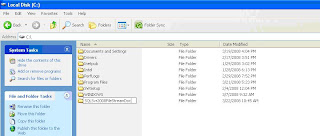


In figure 1 above a folder called SQLSvr2008FILESTREAMDoc has been created within C:\ which will contain all the FILESTREAM objects.


Step 2: Configuring an Instance for FILESTREAM capability
By default, the SQL server instance is disabled for FILESTREAM storage. This property has to be enabled explicitly by using the sp_FILESTREAM_configure system stored procedure.

EXEC sp_FILESTREAM_configure
@enable_level = 3,
@share_name = "MyFILESTREAMSqlServerInstance";
RECONFIGURE

There are two parameters to be provided for this sp, @enable_level and @share_name
• @enable_level = level
Note: This specifies the access level of FILESTREAM storage that you are enabling on the instance of SQL Server.Here level is defined as an integer and it can have a value of 0 to 3.

• @share_name = 'share_name'
Note: This specifies the file “share_name” that is used to access FILESTREAM values through the file system. share_name is a sysname. You can set the share_name value when you change the enabled state from 0 (disabled) or 1 (Transact-SQL only) to file system access (2 or 3).

You may check whether the instance is configured or not by running following query

SELECT SERVERPROPERTY ('FILESTREAMShareName')
,SERVERPROPERTY ('FILESTREAMConfiguredLevel')
,SERVERPROPERTY ('FILESTREAMEffectiveLevel');

Once you run this command in the Query analyzer, you can check whether the share is created or not from the CMD prompt. As shown in figure 2 below, Run NET SHARE in the CMD prompt and see the share with a name which we passed as the second parameter.


Note: When you run sp_FILESTREAM_configure, you might have to restart the instance of SQL Server. A computer restart is required when you enable FILESTREAM storage for the first time, or after you install any update to the RsFx driver. An instance restart is required when you disable FILESTREAM storage from an enabled state. To restart the instance of SQL Server, run the RECONFIGURE statement after you run sp_FILESTREAM_configure.

Permissions
Requires membership in the sysadmin fixed server role and the Windows Administrators group on the local computer.


Step 3: Creat a Database with Filestream Capability
The Next step is to create a new database which will use the FILESTREAM capability.

CREATE DATABASE Archive
ON
PRIMARY ( NAME = Arch1,
FILENAME = 'c:\data\archdat1.mdf'),
FILEGROUP FILESTREAMGroup1 CONTAINS FILESTREAM( NAME = Arch3,
FILENAME = 'c:\SQLSvr2008FILESTREAMDoc\FILESTREAMDemo')
LOG ON ( NAME = Archlog1,
FILENAME = 'c:\data\archlog1.ldf')

Note:
• The only difference in the above statement compared to a normal CREATE DATABASE statement is the filegroup creation for FILESTREAM objects.

• The following phrase in the above statement needs an explanation:
FILEGROUP FILESTREAMGroup1 CONTAINS FILESTREAM( NAME = Arch3,
FILENAME = 'c:\SQLSvr2008FILESTREAMDoc\FILESTREAMDemo'
It is important to make note that the root folder must exist but not the subfolder. i.e. in the folder “SQLSvr2008FILESTREAMDoc” which has already been created in Step1, the subfolder (FILESTREAMdemo) must not exist.
Suppose within c:\ a folder called SQLSvr2008FILESTREAMDoc and a subfolder called FILESTREAMDemo' has been created. If the above mentioned script is run then we would get the following error :-

Error
Msg 5170, Level 16, State 2, Line 1
Cannot create file 'c:\SQLSvr2008FILESTREAMDoc\FILESTREAMDemo' because it already exists. Change the file path or the file name and retry the operation.

Important : As mentioned earlier, it should be noted that the sub folder must not exist. SQL Server will automatically create this sub folder and grant appropriate permissions and other settings. If you drop the database the sub folder will automatically be removed by the system

Once the database has been created , the FILESTREAM folder is as shown in figure below:


Note: This FILESTREAM.hdr file should not be tampered with in anyway to ensure proper functionality. This file is exclusively maintained and used by sql server.

Step 4: Creat a table to store unstructrured data
The next step is to create a table. Once the database is enabled for FILESTREAM capability, you can create tables which have varbinary(max) column to store FILESTREAM objects.

Use Archive
CREATE TABLE Archive.dbo.Records
(
[Id] [uniqueidentifier] ROWGUIDCOL NOT NULL UNIQUE,
[SerialNumber] INTEGER UNIQUE,
[Chart] VARBINARY(MAX) FILESTREAM NULL
)
GO

Note :Here the UniqueIdentifier column is a must. Each row must have a unique row ID. The column which should store BLOB should be of varbinary(max) and you should mention FILESTREAM Atrribute.

Step 5: DML Statements to store Filestream data
Now the database and the table are ready to be stored as BLOB objects.

Inserting data in the table
Inserting a row into a table which contains a FILESTREAM enabled column is just like any other t-sql insert statement. When you insert data into a FILESTREAM column, you can insert NULL or a varbinary(max) value.


Example:
(a) Inserting Null value to a varbinary(max) column
INSERT INTO Archive.dbo.Records
VALUES (newid (), 1, NULL);
Note: If the FILESTREAM value is null then the file in the file system is not created.

(b) The following example shows how to use INSERT to create a file that contains data. The Database Engine converts the string 'Seismic Data' into a varbinary(max) value. FILESTREAM will create the Windows file if it does not already exist. The data is then added to the data file.
INSERT INTO Archive.dbo.Records
VALUES (newid (), 3,
CAST ('Seismic Data' as varbinary(max)));
Note: There are many examples in BOL. Please refer BOL for more FILESTREAM DML statements


Step 6: Deleting FILESTREAM data
Delete From Records

T-SQL Delete statement removes the row from the table as well as the underlying file system files. The underlying files are removed by the FILESTREAM garbage collector.
Note: A FILESTREAM generates minimal log information and hence does not generate enough activity to fill up log files by itself. If there is no other activity generating log entries, CHECKPOINT may not be triggered. Hence, the files will not get deleted at the same time when you delete a corresponding row from the table. Physical deletion of the file happens only when CHECKPOINT occurs, and it happens as a background thread. You don’t see the file deletion immediately, unless you issue an EXPLICIT CHECKPOINT.

Example:
Delete From Records
Checkpoint

Drop FILESTREAM Enabled Database
When you drop a FILESTREAM enabled database , the underlying folders and files are automatically removed.


Figure 4


Figure 4 shows the folder after dropping the database. The subfolder which was created has been removed with all the underlying files automatically
Note: In earlier versions , since the files were stored outside the database, even if you drop the database, the underlying folders and files will not be droped.

Restore the filestream enabled database from Backup
Restoration is as simple as any other normal database restore.

RESTORE FILELISTONLY FROM DISK='E:\archive.bak'
GO
RESTORE DATABASE Archive
FROM DISK='E:\archive.bak'
WITH MOVE'Arch1' TO 'c:\data\archdat1.mdf',
MOVE 'Archlog1' TO'c:\data\archlog1.ldf' ,
MOVE 'Arch3' TO'c:\SQLSvr2008FileStreamDoc\filestreamDemo'
When the restoration scripts run, the database is restored and the corresponding files get restored in the location

MSDN Reference

Designing and Implementing FILESTREAM Storage
http://msdn.microsoft.com/en-us/library/bb895234(SQL.100).aspx

Summary
Though the earlier versions in SQL Server supported BLOB storage, the solution was a bit complex with less flexibility. FILESTREAM enables you to take advantage of both Database’s transactional consistency and Filesystem thus increasing the performance and decreasing the complexity. FILESTREAM also increases the maintainability because database backup is also applicable to FILESTREAM Objects. There is no need to take a separate backup of FILESTREAM objects. In essence, we have a single point of system for storing and managing all kinds of data (structured/unstructured). The size limitation is completely dependent on the disk size. This is another good reason to opt for FILESTREAM.

Tuesday, February 26, 2008

SQL Server 2008 - sp_repladdcolumn and sp_repldropcolumn deprecated

This is one of the common question in SQL Server 2000 DBA interview. How to add a column to a replicated / published table ? The answer is use sp_repladdcolumn and sp_repldropcolumn. If we get this question now, we may ask which version of sql server is this? Since SQL Server 2005 you may use simple DDL command like ALTER to add or drop a column from a published table (of course condition applies (***) like if the subscriber republishes the data then you should use the system sps). In SQL Server 2008 these system sps are deprecated, so you will not have this in next version.

SQL Server 2008- Compatibility Level Supported

This is one important thing to be known before switching or planning to switch to SQL Server 2008. SQL Server 2008 support only the last two versions compatibility levels ie. SQL Server 2000 (80) and SQL Server 2005(90). You can not set Compatibility level to 70 (SQL Server 7.0 ) in sql server 2008.

Saturday, February 23, 2008

SQL Server 2008 - Truncating Transaction Log

How to shrink (re-size ) the transaction log in SQL Server 2008


Scenario :

I have a database with the following size

SELECT name,size from sys.database_files

Result
Test 173056
Test_Log 579072 -- 565 MB

Now I want to truncate Transaction log. In earlier version what we do is we truncate the log and shrink the file.

BACKUP LOG Test with Truncate_only

This statement throw an error with below message

/*------------------------
Backup log Test with Truncate_Only
------------------------*/
LHI-115\SQL2008(sa): Msg 155, Level 15, State 1, Line 1
'Truncate_Only' is not a recognized BACKUP option.

The errior is obevious, this command no more exists in SQL Server 2008. So the question is what is the alternative? As per books online “The transaction log is automatically truncated when the database is using the simple recovery model. If you must remove the log backup chain from a database, switch to the simple recovery model.” So this is the one command you should check before migrating to SQL Server 2008. If you have any script which have WITH TRUNCATE_ONLY option then you have to re-write the script.


How to shrink (re-size ) the transaction log in SQL Server 2008

As per books online , if you switch the Recovery Model to Simple inactive part of the transaction log should be removed. Let us see what happens


(a) select name,recovery_model_desc from sys.databases
Result
name recovery_model_desc

Test Full

(b) Alter database Test SET Recovery simple

Result
name recovery_model_desc

Test Simple


© select name,size from sys.database_files
Result
Test 173056
Test_Log 451352 -- 440 MB


This process reduced the the transaction log file size. But not to the size what i want. I have no option to set the required size as we had this option in SHRINKFile. Do we need shrink the file after switching the Recovery model? Not sure. I have tested the same database in 2005 and I was able to shrink the file to 1024 KB.

I have tried to shrink the TL after switching the Recovery model and the result is as follows :-

DBCC SHRINKFILE (N'test_log' , 1)

DbId FileId CurrentSize MinimumSize UsedPages EstimatedPages
------ ----------- ----------- ----------- ----------- --------------
6 2 451352 128 451352 128


So.. its obevious that its not shrinking. There is no active transaction in TL, that also i checked.


Note : From my SQL Server 2005 and 2000 server i restored few database in 2008 and tried to Truncate TL. For some database this process worked. others do not. I need to look into it what is the problem with the database which could not shrink.

Summary:

In SQL Server 2008 , Transaction can be shrinked in two step.
(a) Change the Recovery Model to Simple
(c) Shrink the file using DBCC ShrinkFile

Wednesday, February 13, 2008

SQL Server 2008 - Transact-SQL Error List Window

SQL Server Management Studio includes an Error List window that displays the syntax and semantic errors generated from the IntelliSense code in the Transact-SQL Query Editor. Its looks like more or less the Error List window available in .NET.

To display the Error List, do one of the following:
• On the View menu, click Error List.

In development environment this enhancement will really come handy .

SQL Server 2008 - Change Data Capture

What is Change Data Capture?

This new feature of SQL Server 2008 will capture all the data modifications(ie. DML- Insert /update / delete) on a table if you configure that table for Change Data Capture. SQL Server community were waiting for this feature for long time. Though earlier versions were provided with few functions and DBCC commands to read Transaction Log, it was never been a complete solution. In couple projects we had these kind of requirements and had to track each Data changes for Audit purpose. With lot of efforts we wrote our own application using Triggers and History table(s).

Change Data Capture is the mechanism to track and capture DML (Insert/Update/Delete) on a Table and stored the captured data in Relational format. A table or few columns in a table can be configured for Data capturing. All data manipulation language (DML) are read from the transaction log and captured in the associated change table. This may be considered as Customized Replication log reader. This is an asynchronous mechanism and there will not be any performance issue for the actual DML which changed the data what so ever. SQL 2008 has set of table valued function to query this trapped data to create report or synchronize standby db. Of course when you log / tack data you may have extra IO that you can not avoid. You can also capture only required columns changes from the table.

How it works?

Each insert or delete operation that is applied to a source table appears as a single row within the change table. The data columns of the row resulting from an insert operations contain the column values after the insert; the data columns of the row resulting from a delete operation contain the column values prior to the delete. An update operation, however, requires two row entries: one to identify the column values before the update and a second to identify the column values after the update.


Pre-Requisite :

(a) SQL Server 2008 Enterprise, Developer, and Evaluation editions : Many of use would not like to here this but it’s the fact.
(b) SQL Server Agent should be up and running

Pre-Conditions

(a) You should not have any Schema already existing with the name cdc. change data capture requires exclusive use of the cdc schema and cdc user. If either a schema or database user named cdc currently exists in a database, the database cannot be enabled for change data capture until the schema and or user are dropped or renamed.

(b) The table columns which you are going to capture should not contain the following reserved column names: __$start_lsn, __$end_lsn, __$seqval, __$operation, and __$update_mask.

(c) captured_column_list cannot contain columns defined with a data type introduced in SQL Server 2008.

Best Practices

(a) Create a separate filegroup for change data capture change tables
(b) Configure only the required table and required columns for CDC

Permission

A member of SYSADMIN fixed server role can enable CDC on the database.
A member of DB_Owner fixed database role can enable can create a capture instance for individual source tables


My questions before starting Change Data Capture process testing

(a) What Edition will support this feature?
(b) Do we need to have Primarykey on the table which we need to track?
(c) What will happen when and CDC enabled table schema changes?
(d) Do we need to follow any extra care when we do Schema changes to CDC enabled tables?
(e) If you Disable CDC from a table, what will happened to the previous data captured.


1. Enable database for CDC

Check whether the database is already enabled CDC or not. Run this query
Select is_cdc_enabled From sys.databases where name='GPx'.

If this query return 0 then its not enabled.

USE AdventureWorks;
GO
EXECUTE sys.sp_cdc_enable_db ;

When a database is enabled for change data capture, the cdc schema, cdc user, metadata tables, and other system objects are created for the database. Just make sure these objects are created.

2. Enabling a Source Table for Change Data Capture :-

By default, all of the columns in the source table are identified as captured columns. If only a subset of columns need to be tracked then use the @captured_column_list parameter to specify the subset of columns


Dynamic Management views for CDC.

Following DMVs can be used to display information about Change Data Capture and Log sessions

(a) sys.dm_cdc_log_scan_sessions
(b) sys.dm_cdc_errors
(c) sys.dm_repl_traninfo

Test Case :-

I have a table called CDCTest to be enabled for CDC and I planned to capture all the columns of the tables.

Enable Table CDCTest for Change Data Capturing


EXECUTE sys.sp_cdc_enable_table
@source_schema = N'dbo'
, @source_name = N'CDCTest'
, @role_name = N'cdc_Admin';
GO

Messages
LHI-115\SQL2008(LHI-115\Madhusudanan):
Job 'cdc.GPx_capture' started successfully.
LHI-115\SQL2008(LHI-115\Madhusudanan):
Job 'cdc.GPx_cleanup' started successfully.

Do some DML Operation on this table

delete top (3) from cdctest
Insert CDCTest (PLIContainerID,CenterTypeID,TotalVisits) select 1,222,333

Update CDCTest set Code='xxxxx' where plicontainerid between 1 and 20

Query Functions to get the trapped data.

DECLARE @begin_time datetime, @end_time datetime, @from_lsn binary(10), @to_lsn binary(10);

SET @begin_time = GETDATE()-1;
SET @end_time = GETDATE();
-- Map the time interval to a change data capture query range.
SELECT @from_lsn = sys.fn_cdc_map_time_to_lsn('smallest greater than or equal', @begin_time);
SELECT @to_lsn = sys.fn_cdc_map_time_to_lsn('largest less than or equal', @end_time);

-- Return the changes occurring within the query window.
SELECT * FROM cdc.fn_cdc_get_all_changes_dbo_CDCTest(@from_lsn, @to_lsn, 'all');


Wrapper Stored Procedure to get CDC captured information for a given table

IF OBJECT_ID(N'dbo.spGetCDCInformationForATable') IS NOT NULL
BEGIN
PRINT 'Dropping Stored Procedure: [dbo].spGetCDCInformationForATable'
DROP PROCEDURE dbo.spGetCDCInformationForATable
END

PRINT 'Creating Stored Procedure: [dbo].spGetCDCInformationForATable'

GO
/******************************************************************************

Copyright 2008

Procedure : [spGetCDCInformationForATable]
Author :
on : <08-Feb-2007>
Description : Get Data captured through Change Data Capture for a given Table

Pending Issue : Nil

Returns : @Err

Date Modified By Description of Change

------- ---------------- --------------------------------
****************************************************************************************/

Create Procedure spGetCDCInformationForATable
@TableName sysname,
@SourceTableSchmea sysname,
@begin_time datetime,
@end_time datetime
As
Begin

DECLARE @from_lsn binary(10), @to_lsn binary(10);


-- Map the time interval to a change data capture query range.
SELECT @from_lsn = sys.fn_cdc_map_time_to_lsn('smallest greater than or equal', @begin_time);
SELECT @to_lsn = sys.fn_cdc_map_time_to_lsn('largest less than or equal', @end_time);

-- Return the changes occurring within the query window.

Declare @SqlStmt nvarchar(1000)
Set @SqlStmt ='SELECT * FROM cdc.fn_cdc_get_all_changes_'+@SourceTableSchmea+'_'+@TableName+'(@from_lsn, @to_lsn, ''all'')'

Exec sp_ExecuteSQL @SqlStmt,@params=N'@from_lsn binary(10), @to_lsn binary(10)' ,@from_lsn =@from_lsn ,@to_lsn=@to_lsn


End

What will happen when and CDC enabled table schema changes?

You can very well add a new column. Obeviously, data in this column will not be tracked. Then what will happen if the column is dropped. CDC is not tracking any Schema Changes it seems. If you add or drop column it don’t care. CDC function still return the same number of columns as when the CDC is enabled

alter table cdctest Add column ColAddedAfterEnableCDC int

insert into cdctest(PLIContainerID,ColAddedAfterCDCEnabled) select 111111111 ,222

alter table cdctest drop column completedon

DDL modifications to the source table that change the source table column structure, such as adding or dropping a column, or changing the data type of an existing column, are maintained in the cdc.ddl_history table. These changes can be reported by using this stored procedure. Entries in cdc.ddl_history are made at the time the capture process reads the DDL transaction in the log.

You can track the DDL activity on a CDC enabled Table using sys.sp_cdc_get_ddl_history system stored procedure. This sp Returns the data definition language (DDL) change history associated with the specified capture instance since change data capture was enabled for that capture instance


Disable Change Data Capturing

sys.sp_cdc_disable_db_change_data_capture :
Disable Change Data Capturing on current database

sys.sp_cdc_disable_table_change_data_capture
Disable Change data capture for the specified source table in the current database. sys.sp_cdc_disable_table_change_data_capture drops the change data capture change table and system functions associated with the specified source table and capture instance. It deletes any rows associated with the specified capture instance from the change data capture system tables and sets the is_tracked_by_cdc column in the sys.tables catalog view to 0.

SQL Server 2008 - Table-Valued Parameter

It has always been a problem in earlier versions to pass multi row –multi column (record set) parameter from a Stored procedure or a function. In 2008 this problem is solved and now you can pass Table variable as parameter between stored procedures and functions.

How it works?
The first step in this is to create a User Defined Table datatype in the database. Once you created the User Defined datatype(UDT) of table you can declare a variable of that UDT as input parameter of a sp or function.

(a) Create a User TABLE Type

CREATE TYPE TestTableTypeParm AS TABLE (EmpID int primary key,
EmpType varchar(10),
EmpName varchar(50),
CHECK (EmpType IN ('MNGR', 'CLRK', 'TECH') ))


(b) Create stored procedure with a Table type as input parameter.
Create PROCEDURE spTestTableTypeParm

(@TVP TestTableTypeParm READONLY,
@someotherparam int )
As
Select *From @TVP

(c) How to call this stored procedure

Declare @TVP as TestTableTypeParm
Insert @TVP select 1,'MNGR','aaaa'
Insert @TVP select 2,'CLRK','bbb'
Insert @TVP select 3,'TECH','ccc'

Exec spTestTableTypeParm @TVP,1


(d) Create a function with table type input parameter

CREATE FUNCTION ufn_TestTablevaluedParameter(@TVP TestTableTypeParm READONLY)
RETURNS TABLE
AS
RETURN
(
select *From @TVP
);
GO

(f) How to call function with tabletype input parameter

Declare @TVP as TestTableTypeParm
Insert @TVP select 1,'MNGR','aaaa'
Insert @TVP select 2,'CLRK','bbb'
Insert @TVP select 3,'TECH','ccc'

Select *From ufn_TestTablevaluedParameter(@TVP)


There are many Limitations mentioned in Books online. These are probably most significant among them

(a) SQL Server does not maintain statistics on columns of table-valued parameters.

(b) Table-valued parameters must be passed as input READONLY parameters to Transact-SQL routines. You cannot perform DML operations such as UPDATE, DELETE, or INSERT on a table-valued parameter in the body of a routine.

(c) You cannot use a table-valued parameter as target of a SELECT INTO or INSERT EXEC statement. A table-valued parameter can be in the FROM clause of SELECT INTO or in the INSERT EXEC string or stored-procedure.

(d) A user-defined table type cannot be used as a column in a table or a field in a structured user-defined type.

(e) A DEFAULT value cannot be specified in the definition of a user-defined table type.

(f) The user-defined table type definition cannot be modified after it is created.

(g) User-defined functions cannot be called within the definition of computed columns of a user-defined table type.

Summary

(a) We can use declare table-valued variables within dynamic Transact-SQL statements and pass these variables as table-valued parameters to stored procedures and functions.
(b) The table valued variable data can not be modified inside the object where its referred. It has to be READONLY.
© In SQL Server 2000, it was not allowed to insert the output of an stored procedure to a table type variable. This was solved in SQL Server 2005 and it was possible to insert the output of an sp to table variable. But Table-Valued parameter has again have this limitation. You can not use in Select Into or INSERT EXEC.
(d) sys.table_types : This system object will retrun all the Table types in the database.
select *from sys.table_types

SQL Server 2008 - New functions for Date and Time

I am not aware of any functions date function deprecation in 2008. There are new functions added to compliment new datatypes.

(a) SYSDATETIME() : Returns the current database system timestamp as a datetime2(7) value. The database time zone offset is not included. This value is derived from the operating system of the computer on which the instance of SQL Server is running.
select SYSDATETIME() : Result : 2008-02-10 10:12:54.8750000

(b) SYSDATETIMEOFFSET () : Returns the current database system timestamp as a datetimeoffset(7) value
select SYSDATETIMEOFFSET() --Result : 2008-02-10 10:12:09.6406250 +05:30

(c) SYSUTCDATETIME() : Returns the current database system timestamp as a datetime2(7) value. The database time zone offset is not included.
Select SYSUTCDATETIME() –- Result 2008-02-10 04:44:52.1875000

(d) SWITCHOFFSET() : Returns a datetimeoffset value that is changed from the stored time zone offset to a specified new time zone offset.
SELECT SWITCHOFFSET ('2008-02-10 7:45:50.71345 -5:00', '-08:00') as SWITCHOFFSETResult

(e) TODATETIMEOFFSET () : Changes the time zone offset for a date and time value. This function can be used to update a datetimeoffset column.
SELECT TODATETIMEOFFSET ('2008-02-10 7:45:50.71345 -5:00', '-08:00') as TODATETIMEOFFSET


Books online have sample script to explain these functions.

SQL Server 2008 - New Datatypes

Major enhancement in this front is new Date and Time datatypes and related functions.

Here Overview of the new Date and time datatypes

(a) Date : Date only which can store date raging from 0001-01-01 through 9999-12-31 ie. January 1, 1 A.D. through December 31, 9999 A.D. The storage size is 3 byte and Date datatype gives One day accuracy.

(b) Datetime2 : Its an extension to existing Datetime datatype and datetime2 can have larger range and accuracy. Existing Datetime range limitation is January 1, 1753, through December 31, 9999. Datetime2 provides range from 0001-01-01 through 9999-12-31. The storage size is 8 byte for both datetime2 and datetime. For all new developments its recommended to use Datetime2 because is more portable and it gives more second precision.

(c) Time : Defines a time of a day. The time is without time zone awareness and is based on a 24-hour clock. This provides more accuracy in terms of time than existing datetime datatype. Time datatype ranges 00:00:00.0000000 through 23:59:59.9999999 where as existing datetime data type only gives 00:00:00 through 23:59:59.997. It also provides a feature in which user can specify the precision they wanted from 0 to 99 nanoseconds. The storage size is 5 bytes, fixed, is the default with the default of 100ns fractional second precision.
SELECT CAST(getdate() AS time) AS 'time' – Default
Result : 09:43:13.6230000
SELECT CAST(getdate() AS time(2)) AS 'time' – User specific 2 percision
Result : 09:43:57.69
In the above example, the figure within brackets (ie 2) specify what precision we want. By default (if we not specify) its 7.

(d) datetimeoffset : Defines a date that is combined with a time of a day that has time zone awareness and is based on a 24-hour clock. datetimeoffset have three parts. Date part , time part and timeoffset part. Datetimeoffset ranges from 0001-01-01 through 9999-12-31 and it takes 10 byte for storage.

(e) Hierarchyid : I have not tried this yet, for now I just wanted to mention that there is a new system datatype called Hierarchyid in SQL Server 2008. Books online has very detailed section on this, I need to check that

Conclusion

These date and time datatypes are definitly mosuse wanted datatypes for long time. For any new development purpose use these new datatypes available. I need to explore more with these datatypes. Books online has very detailed documentation with examples which needs to be referred.